Display Elements
Speed, height, distanceThe Dashboard.
"What's in a car. And more."
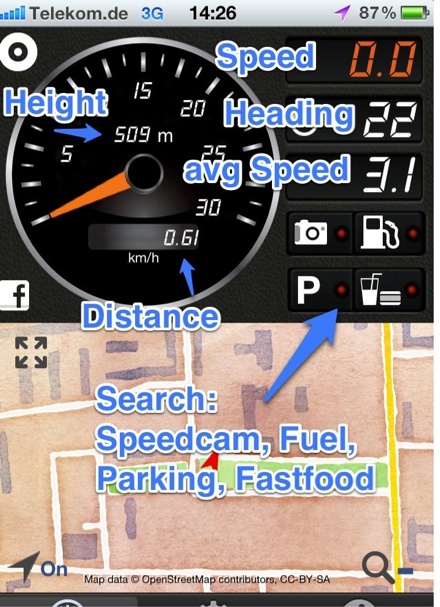
The central element is the speedometer. You can switch between km/h and mph in the options. Choose also the maximum scale between 30 and 360. The digits above show the height as measured by GPS. Above is the distance meter. You set it to zero by simple tap on it. This also resets the average speed meter. In the upper right you'll see the the display for speed. Above the heading and on 3. position the average speed.
The Buttons
They are bigger than they appearUse App only when it's safe!.
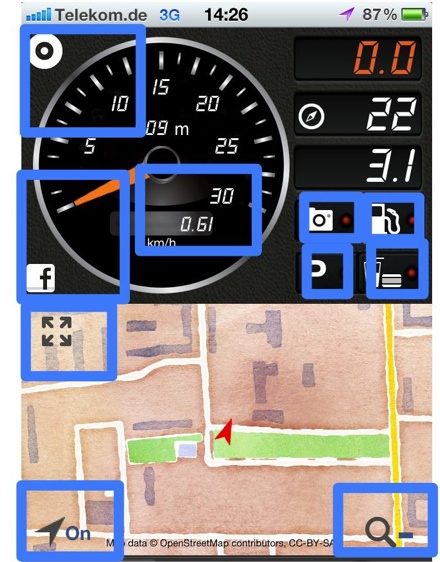
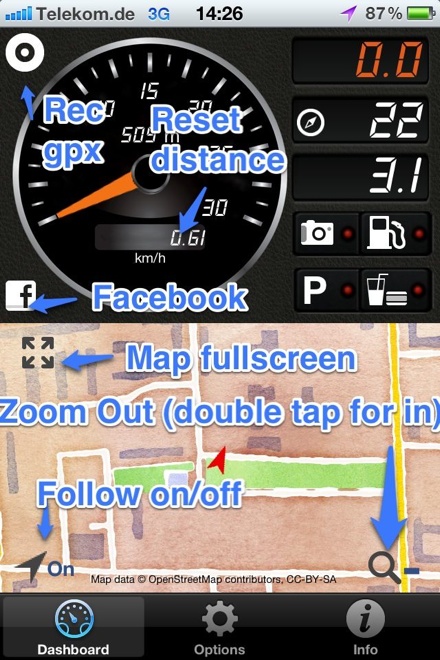
In the upper left corner, in-app purchase only, you find the button to start and stop the logging. In the lower left there is the button to post your actual position to Facebook. The 4 buttons below can toggle the search for speed-cams, fuel stations, parking and fast-food. With in-app-purchase you can switch sound effect on for speed cameras. The buttons on the map are:
- Toggle map: Map in full size
- Follow mode: Switch off to move map as you like.
- Zoom out: Zoom out (hint: use double tap to zoom in)
Buttons on the main screen
Again, use only when it's safe
See the touch zones in the picture above.